Choosing the right Tft Capacitive Touch Screen is not merely a matter of selecting the largest display. It requires matching optical performance, touch accuracy, environmental resistance, and lifecycle expectations to the product’s real operating conditions. A medical monitor, factory controller, vehicle terminal, and retail kiosk face very different demands. Finger size, glove use, moisture, sunlight, vibration, and cleaning chemicals can change the result.
Market evidence shows why this decision matters. Grand View Research has reported continued growth in the global touch screen market, driven by smartphones, automotive interfaces, industrial equipment, and smart appliances. MarketsandMarkets also identifies rising demand for touch-enabled human-machine interfaces and projected expansion in touch controller technologies. These reports indicate opportunity, but market growth alone does not prove that every panel will perform reliably in your application. Specifications can mislead.
Look beyond resolution and diagonal size. Check projected capacitance technology, cover-glass thickness, sensor structure, controller compatibility, brightness, contrast, viewing angle, and response time. Ask for test data at the intended temperature range. Test wet fingers, protective gloves, repeated taps, and edge touches. A screen that works perfectly in a clean laboratory may fail beside an outdoor production line. Experience often reveals this gap.
Reliability also depends on integration. Confirm the LCD interface, mounting tolerance, bonding method, EMI performance, and availability of replacement units. ISO 9241 guidance on human-system interaction can support usability decisions, while IEC 60068 environmental testing methods help structure durability evaluations. No single report replaces application testing. The better choice is the panel that remains accurate, readable, and serviceable after years of actual use.
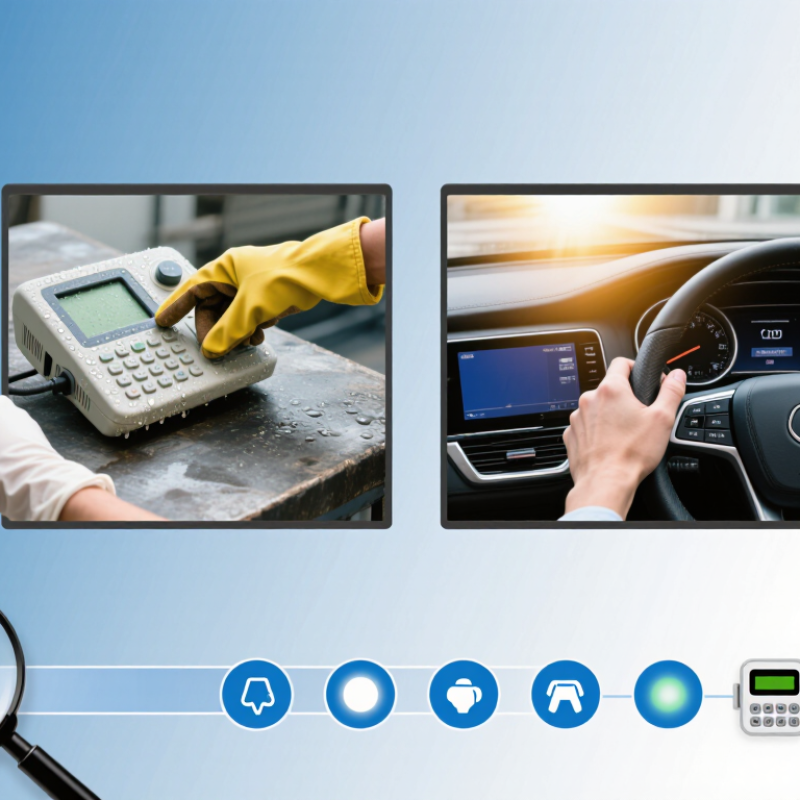
Choosing the right TFT capacitive touch screen begins with defining the application, not the display size.
Describe where the screen will operate. An indoor kiosk may face bright windows, while outdoor equipment needs sunlight readability. Identify whether users wear gloves, touch with wet fingers, or operate the screen with a stylus. Record expected daily usage, temperature, humidity, dust, and vibration. Small details matter.
Specify the active area, resolution, brightness, viewing angle, and cover-lens thickness. Then define touch performance clearly. Consider finger size, glove thickness, simultaneous touches, response time, and palm rejection. A thick protective lens can reduce sensitivity, especially near the edges. The housing design also affects performance through air gaps, pressure points, and adhesive choices. Lab results can mislead. Test a sample inside the actual enclosure.
For demanding equipment, request evidence from controlled reliability and electromagnetic tests. ESD and immunity testing should reflect the installation environment, with suitable methods such as IEC 61000-4-2. Ask for test conditions, sample quantities, and failure records instead of accepting vague durability claims. Check the interface, firmware support, calibration process, and expected service life. A reliable supplier should explain component traceability and production controls. I would also test several units across temperature and humidity ranges. One successful sample is not enough. Leave practical margin for assembly variation, user behavior, and future protective changes.
Choosing a TFT capacitive touch screen starts with the enclosure, not the catalog. Measure the visible opening, bezel space, and finger reach. A 4.3-inch panel suits compact controllers, while 7 to 10 inches improves reading and gesture accuracy. Mordor Intelligence’s 2024 Touch Screen Market report forecasts continued growth through 2029, driven partly by interactive industrial and automotive interfaces. That growth does not mean every product needs a larger screen.
Resolution should match viewing distance and content density. For a 5-inch display viewed at 30 centimeters, 800 × 480 pixels can provide readable controls. A 7-inch panel may justify 1280 × 800 pixels when charts, maps, or small labels appear together. I still see teams overbuy resolution. That raises cost and power use. Pixel density matters more than headline numbers. Use a prototype with real icons, gloves, and sunlight before approving the specification.
Viewing angle deserves physical testing. A 178-degree rating often describes contrast performance, not comfortable operation from every position. The IEC 61747-1 measurement framework helps engineers compare display characteristics, but installation geometry remains decisive. For a panel mounted beside machinery, select a wide-angle TFT and check color shift at 45 degrees. Display Daily’s 2024 market analysis also highlights application-specific display requirements across industrial equipment. A small mistake here can make a technically excellent screen frustrating. Test the screen while standing, leaning, and wearing protective gloves.
Choosing the right TFT capacitive touch screen requires more than checking resolution. Touch sensitivity must match the user’s real working conditions. A 2024 MarketsandMarkets industry report identifies consumer, automotive, and industrial equipment as major application areas, each demanding different touch performance.
Test the screen with bare fingers, thin gloves, and slightly wet hands. A reliable panel should recognize deliberate taps near the edges without registering accidental contact. Response time matters too. For control interfaces, a delay below 100 milliseconds usually feels responsive, although the complete system can add more latency. I have found that sensitivity settings are often tuned too aggressively. That creates false touches. It needs a second test.
Interface selection affects integration and long-term maintenance. I²C suits compact, low-pin-count designs, while SPI generally supports faster data transfer over short connections. USB simplifies connection to computing platforms but may increase power and software complexity. Review the display controller’s documentation, cable length limits, electromagnetic compatibility data, and operating voltage before approving a prototype.
Environmental conditions can change performance quickly. IEC 60529 ingress ratings help define protection against dust and water, while IEC 61000-4-2 provides an electrostatic discharge testing framework. A 2023 industrial display market report also highlights outdoor and factory applications as important growth areas, where temperature, vibration, and contamination are common. Test condensation, sunlight readability, and gloved operation in the actual enclosure. Laboratory results alone can mislead.
| Evaluation Dimension | What to Check | Indoor Office or Consumer Device | Industrial or Medical Equipment | Outdoor, Marine, or Vehicle Application | Selection Guidance |
|---|---|---|---|---|---|
| Touch Technology | Projected capacitive touch, number of touch points, controller compatibility, and expected input method. | Standard projected capacitive touch with 5-point or 10-point support is usually sufficient. | Use a controller with stable calibration, noise rejection, and reliable operation with protective overlays. | Choose a solution designed for water, electromagnetic noise, temperature variation, and occasional glove use. | High Priority Projected capacitive technology provides fast response, durable operation, and multi-touch capability, but performance depends strongly on the cover glass and controller tuning. |
| Touch Sensitivity | Minimum activation force, response time, touch accuracy, edge performance, and false-touch behavior. | Target consistent finger detection across the active area with a typical response time below 100 ms. | Verify accuracy near the edges and through gloves or a protective film; test repeated touches and long-duration operation. | Confirm that rain, condensation, vibration, and conductive contamination do not create unintended touches. | High Priority Do not judge sensitivity only by a brief finger test. Test the final display stack, including the TFT panel, cover lens, adhesive, bezel, and enclosure. |
| Glove and Stylus Operation | Glove material and thickness, passive stylus support, active stylus requirements, and palm rejection. | Finger-only operation is normally adequate; a fine-tip passive stylus may be useful for menus or signatures. | Specify support for work gloves, medical gloves, or thick protective gloves if required by the workflow. | Test with wet gloves, insulated gloves, and the exact stylus type used in the field. | High Priority Glove support is not universal. Sensitivity must be verified with the exact glove material, cover thickness, and operating temperature. |
| Touch Interface | Communication protocol, cable length, operating-system support, connector type, and controller integration. | I²C is common for embedded systems; USB is convenient for host computers and many standard operating systems. | I²C or SPI can reduce wiring inside an embedded product; select USB when driver simplicity and host compatibility are more important. | Use a robust connector and cable design with suitable shielding, strain relief, and protection against electrical noise. | High Priority I²C uses fewer lines but is intended for short board-level connections. SPI can provide higher throughput over short distances. USB is practical for longer external connections but requires appropriate software support. |
| Display Interface | RGB, LVDS, MIPI DSI, or another video interface; resolution; refresh rate; processor support; cable length. | Choose the interface natively supported by the host board to avoid unnecessary conversion hardware. | LVDS or MIPI DSI may be suitable depending on the processor, cable design, resolution, and electromagnetic environment. | Prioritize a proven interface and locking connectors; validate signal integrity across the final cable length and enclosure. | High Priority The touch interface and display interface are separate design decisions. Confirm both before selecting the TFT module. |
| Cover Glass and Optical Stack | Glass thickness, surface treatment, optical bonding, reflectance, haze, and mechanical durability. | Anti-glare or anti-fingerprint treatments can improve usability under indoor lighting. | Thicker glass or chemically strengthened glass may improve durability, but it can reduce touch sensitivity if the controller is not tuned for it. | Optical bonding can reduce internal reflections and improve sunlight readability; anti-reflective treatment may also be necessary. | High Priority Increasing cover-glass thickness generally reduces capacitive coupling. Require touch validation after the complete optical stack is assembled. |
| Brightness and Readability | Typical luminance, contrast, viewing angle, sunlight readability, backlight lifetime, and automatic brightness control. | Approximately 250–400 cd/m² is often adequate for controlled indoor lighting. | Approximately 400–800 cd/m² may be appropriate when equipment is used under bright factory lighting or near windows. | Outdoor use may require approximately 800 cd/m² or more, together with low-reflection glass and thermal management. | High Priority Required brightness depends on ambient light and reflections. Higher brightness increases power consumption and heat, so validate the complete enclosure. |
| Operating Temperature | Display operating range, touch-controller range, storage range, startup behavior, and temperature-related calibration drift. | A 0°C to 50°C operating range is commonly suitable for climate-controlled products. | A wider range such as -20°C to 70°C may be needed for factory equipment, depending on the installation location. | Vehicles and outdoor systems may require ranges such as -30°C to 80°C or wider; confirm the limits of every component. | High Priority The usable temperature range is limited by the weakest component. Check the TFT panel, touch controller, adhesive, cable, and backlight separately. |
| Water and Contamination Resistance | Use in rain, condensation, cleaning procedures, dust, oil, salt spray, and the enclosure’s ingress-protection design. | Basic splash resistance may be enough when the product is used indoors and cleaned infrequently. | Specify resistance to repeated cleaning agents, dust, oils, and accidental splashes according to the application. | Use a sealed front surface and validate the complete assembly against the required ingress-protection level. | High Priority Water can change the electrical field and cause false touches. A water-resistant enclosure does not automatically guarantee reliable touch operation in rain. |
| Electromagnetic Compatibility | Immunity to conducted and radiated interference, emissions, grounding, shielding, and cable routing. | Normal consumer environments generally require standard EMC validation. | Test near motors, relays, inverters, medical equipment, and other high-noise electrical sources. | Validate operation near ignition systems, high-current wiring, radio equipment, and vehicle power transients. | High Priority Touch noise performance depends on PCB layout, grounding, shielding, firmware filtering, and the mechanical stack—not only the touch panel. |
| Mechanical Durability | Impact resistance, surface hardness, bezel support, vibration, shock, mounting method, and repeated touch cycles. | Standard glass and a supported bezel are usually adequate for light daily use. | Use reinforced mounting and validate vibration, shock, repeated cleaning, and accidental impacts. | Check resistance to vibration, thermal expansion, impact, and enclosure flexing over the full service life. | Medium Priority A rigid mounting structure helps prevent optical stress and touch-performance changes caused by panel flexing. |
| Power Consumption and Heat | Backlight power, touch-controller power, standby mode, brightness control, and heat dissipation. | Low-power backlight control and sleep mode can extend battery life. | Balance brightness, continuous operating time, and enclosure temperature during 24/7 operation. | Account for solar heating and limited airflow; verify that internal temperature remains within component limits. | Medium Priority Higher brightness and sealed enclosures can increase thermal load. Test power and temperature at maximum brightness and maximum ambient temperature. |
| Viewing Angle and Orientation | Horizontal and vertical viewing angles, image inversion, mounting orientation, and polarized-sunglass readability. | Wide viewing angles improve shared-screen usability in offices and public areas. | Confirm readability from the operator’s normal standing or seated position. | Test portrait or landscape mounting, direct sunlight, and viewing through polarized sunglasses. | Medium Priority Panel viewing-angle specifications are normally measured under controlled conditions; verify real-world readability with the final cover glass. |
| Calibration and Firmware | Factory calibration, field recalibration, firmware update method, filtering, palm rejection, and coordinate mapping. | Standard calibration with basic gesture support is generally sufficient. | Choose configurable filtering and coordinate mapping when accuracy and repeatability are important. | Verify recovery after power interruption, moisture exposure, temperature changes, and communication errors. | Medium Priority Firmware settings can improve noise rejection but may also increase latency. Tune and test the complete system rather than relying on default values. |
| Testing and Acceptance Criteria | Test method, sample size, environmental conditions, touch accuracy, latency, false-touch rate, and long-term stability. | Test normal finger input, multi-touch gestures, screen edges, and common protective films. | Include gloves, cleaning agents, vibration, temperature cycling, EMI exposure, and continuous operation. | Include rain or water spray, condensation, sunlight, dust, salt exposure, vehicle vibration, and power transients. | High Priority Approve the module only after testing it in the final mechanical, electrical, optical, and software configuration. |
Note: The values shown are practical engineering targets and common design ranges, not guaranteed specifications for every TFT capacitive touch screen. Always confirm the manufacturer’s datasheet and validate the complete assembled product.
Choosing a TFT capacitive touch screen starts with the panel materials. Glass surfaces usually resist scratches better than plastic layers and feel smoother during repeated tapping. Plastic can reduce weight and cost, but it may show marks after months of cleaning. I have seen a screen look perfect during installation, then develop fine scratches near frequently used buttons. Ask for surface hardness data, coating details, and cleaning compatibility. Do not rely on appearance alone.
Durability also depends on the environment. Outdoor equipment needs strong cover glass, sealed edges, and stable touch performance with wet fingers. Brightness should match the installation site, not simply reach the highest advertised value. A display near a sunny window may need around 800 nits or more, while an indoor control panel may work well below that level. Excessive brightness can increase heat and power use. Viewing angle, optical bonding, and anti-glare treatment also affect readability. I once prioritized brightness and overlooked reflections; the result was disappointing.
Tips: Compare measured brightness, not only specifications. Check power consumption at normal brightness and during touch activity. Review the screen’s operating temperature range. Test gloves, moisture, and repeated presses before approval. A simple 30-day trial can reveal problems that laboratory figures miss. Keep spare units in mind, because replacement access is often ignored. Choose the balanced panel, not the most impressive sheet.
How to Choose the Right TFT Capacitive Touch Screen?
Compatibility should be verified before discussing appearance or price. Check the display size, resolution, interface, voltage, connector position, and mounting dimensions. Review the controller’s communication protocol and operating system support. A screen may look identical but use different timing parameters. That small mismatch can stop the whole system.
Customization also needs clear limits. Ask whether the supplier can adjust brightness, cover-glass thickness, printing, bonding, or touch sensitivity. Define the working temperature and expected glove use. Test the screen with moisture, dust, vibration, and repeated touches. A short laboratory check is not enough. Try real cables, real enclosures, and actual user gestures. Test early.
Total cost includes more than the unit quotation. Add tooling, samples, engineering changes, shipping, inspection, firmware work, and possible rework. Confirm minimum order quantities and replacement support. Request a written test report with measurable results, not only “passed.” A practical mistake is comparing two prices before comparing their included services. The cheaper option may need extra assembly or calibration. Perfect planning is unrealistic. Leave room for one failed sample and one design revision. That cost is easier to manage before production begins.
This illustrative decision model assigns a 100% evaluation weight across four practical purchasing dimensions. Verify electrical and mechanical compatibility first, confirm customization support, require documented environmental and touch-performance testing, and compare total cost across the complete product lifecycle rather than unit price alone.
Measure the enclosure opening, bezel space, and finger reach first.
Match resolution to viewing distance and content density. At 30 centimeters, 800 × 480 pixels can suit a 5-inch screen. A 7-inch panel may need 1280 × 800 pixels for maps and charts. Test real icons before approval.
Very important, especially beside machinery. A wide-angle panel may still show color shifts at 45 degrees. Check it while standing, leaning, and wearing gloves. Ratings can mislead.
Test bare fingers, thin gloves, wet hands, and edge taps. The screen should recognize deliberate presses without false touches. A response below 100 milliseconds usually feels responsive. Still, the whole system may add delay. One test is not enough.
I²C suits compact designs with fewer connection pins. SPI usually supports faster transfers over short cables. USB simplifies computer connections but can increase power and software complexity. Check cable limits, voltage, and controller documentation.
Test dust, water, condensation, sunlight, vibration, and temperature changes. Use the actual enclosure when possible. Check moisture and glove operation. Laboratory results may look better than reality.
Glass usually resists scratches better and feels smoother. Plastic can reduce weight and cost. After months of cleaning, plastic may show marks. Ask about hardness, coatings, and cleaning compatibility. Appearance alone is insufficient.
Match brightness to the installation site. A sunny window may require about 800 nits or more. An indoor panel may need much less. Excess brightness raises heat and power use. I once chose brightness first and ignored reflections.
Compare brightness at normal settings, not only maximum output. Measure power during display operation and touch activity. Run a 30-day trial with repeated presses and real gloves. Keep spare units accessible. That detail is often forgotten.
Choosing the right Tft Capacitive Touch Screen begins with clearly defining the application requirements, including the intended environment, user interaction, operating conditions, and expected service life. Select a suitable display size, resolution, and viewing angle to ensure comfortable viewing and effective operation. Touch sensitivity should match the application, while interface options must be compatible with the host system. Environmental factors such as temperature, humidity, dust, vibration, and possible exposure to moisture should also be considered.
A complete evaluation should compare panel materials, surface durability, brightness, contrast, and power consumption. Before making a decision, verify mechanical, electrical, and software compatibility, and confirm whether customization support is available for dimensions, connectors, or touch performance. Reliable testing, sample validation, quality control, and after-sales support can reduce integration risks. Finally, assess the total cost, including development, installation, maintenance, and long-term operating expenses, rather than focusing only on the initial purchase price.
Xunrui Display